Featured

Using Rules to Compose better Photos

Introduction to Photography, Shot composition

This lesson plan will take place over five to six 55 minute class periods with the creation of a final project at the end to show understanding. Students will learn three of the most basic rules of shot composition. These will help them see and set up better shots when in the field. This lesson has a final project that can be presented or shared with the instructor. If everyone one presents it allows everyone to see a few more examples. 

Materials:

Equipment:

  • Cell Phones
  • DSLR Cameras
  • Computers or Chromebooks
  • Adobe Bridge

Objectives:

  • Students will learn the basic terminology involved in shot composition
  • Students will learn how to shoot in shutter priority and manual priority
  • Students will learn to upload and store photos by using Adobe Bridge
  • Students will learn to edit photos in Adobe Bride, using camera raw

Day 1: Shot Composition

Go over the powerpoint with the students teaching them about shot composition. If they have any time remaining have them look at the following websites for some extra guidance.

Shot Composition Google Slides Doc

Review the basics of shot composition

  • Leading Lines
  • Rule of Thirds
  • Framing

Website for Composition Rules

Another set of Composition Rules and Photos

Day 2: Photo practice day

Photo Day: All students need to complete the photo assignment.

Photo Assignment Handout

Day 4: Upload Photos and Prepare to Share

  • Watch Camtasia Video on uploading and editing in bridge
  • Video on Editing
  • Upload photos to the students folder in K drive. Edit and create powerpoint showing and explaining images.

Day 5: Finish Powerpoint and start sharing if ready

See attached for grading criteria

Grading Rubric

Featured

Spicing up your Stories with Online Tools

This week’s assignment was to dive into the world of creating graphics, maps and surveys. I have done a few of these things, but I tried to use different creation tools this time around. Let’s start off with the map. I used ArcGIS and I am putting together a lesson plan to guide my students through it. The biggest downfall I found to the one I used was I could only attach one picture to the points I put on my map. My original intention was to create a slideshow under each point, but the software I used would not allow it.

It does however do some amazing things. Here is an example of what it can do. I should probably not show everyone this one before I show you my map, but it is pretty awesome so I wanted you to see it.  

Coronavirus Map  Example of what this site can really do (not my creation)

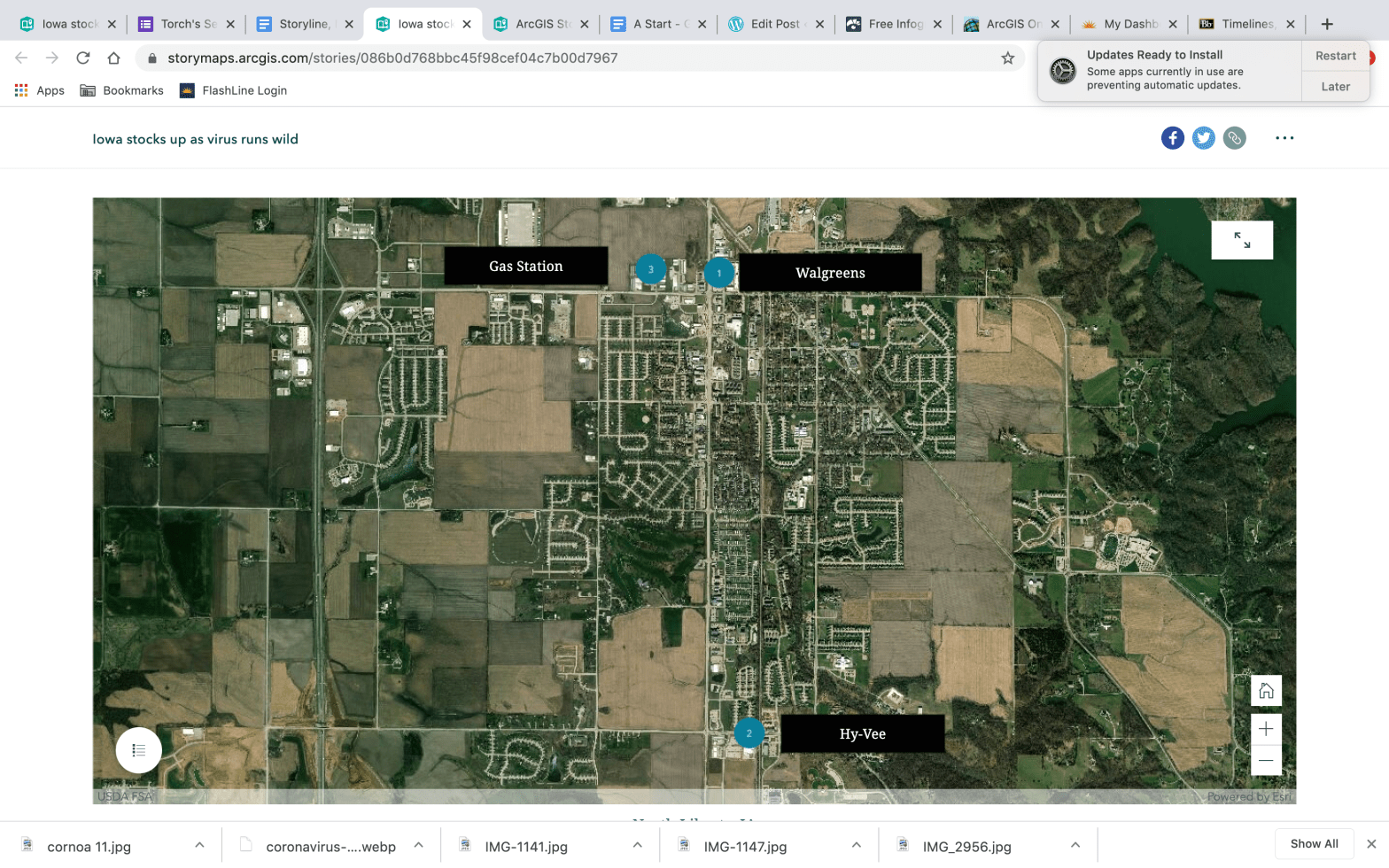
North Liberty, IA Map (my creation)

Creating the map was easy. If I was going to do it again I would want more data to plot. That would make it a little more comprehensive, but in a time when I was not really dying to go into multiple stores due to the Coronavirus pandemic I figured three was enough. So that is where I stopped. I could see this being a great tool for listing something like what seniors are doing after graduation. It could be used to plot spring break destinations or a number of other school related things. It would also be a great sports tracking tool. I could see using the map and posting player stats or team stats on it during a sports season or even listing the musicals happening in Iowa during the school year. I will be looking into maps with my students later this year if we return to school.

The second part of this assignment was something I have used before, but I needed some input on what to include in our senior magazine so this was a good way to do it. I used Google forms to create a short survey/questionnaire. I kept the questions multiple choice for the most part except for a couple that were short answers or prompts for students to submit their own. It has worked well so far, but we have not pushed out through the school social media so only a limited number of students have taken it. Below is a screenshot of the limited results. So far it is giving me a clear idea of what students want to see in the senior magazine. The last two questions allow students to submit their own material. This was my attempt at crowd sourcing some great photos for the magazine. Hopefully, it works.

If you want to take the survey or look at it online you can find it here:

Senior Magazine Survey using Google forms

The final element I completed for this assignment was a timeline. After my recent post about the violence in Cedar Rapids I decided to make a timeline of the events. My hope was to create something simple that could accompany an article or podcast. It was an easy element to create and there were plenty of different designs to choose from. I have already encouraged my students to create one for the Coronavirus and the schedule changes that have come with it.

I used the following website to create my timeline. All I had to bring to it was photos and evidence. 

Visme

Here is my timeline for the recent string of violent events in Cedar Rapids. 

Violence in Cedar Rapids

All of these resources can add visual elements to any print or web article. They were easy to use and for the most part students will be able to handle the learning curve better than most adults. Check it out and put the kids to work. They will impress you with what they can do using these tools.

The Confusion of Video

This project seemed easy enough. Find a story. Film some stuff. Done.

It was not that easy.

The struggles started with filming. Wind. Wind is crazy. I recorded the first time with just my DSLR camera and you could tell. The wind noise was astounding. So the next time I called a student and got a hold of a shotgun mic with a big furry thing that looked like a dead rabbit on it. It helped. The sound was better and the background noise was cut down. I also learned that you can cut some of that background noise out in editing depending on the program you are using. If you are using Adobe Premiere Pro you can go in and use noise deduction and it really helps. Might have saved one of my interviews. Learn the editing tricks. It makes your video better.

You are not good enough to hold your camera still. Use a tripod. I learned this one from experience. Sure I looked cool filming without one, but the video was not good enough for me.

Don’t move during your shots. I ended up borrowing a gimble or gamble to get some panning shots, because the ones I tried without one were not good. Once again I called on one of my students for advice. It really does help to have a student who knows more than you.

Finally, when it comes to editing you need to watch tutorials and work right along side of them. You need to be completing the task as you are watching it so you can remember it. If you do not know how to do something Google it. Googled everything and it made life a lot easier.

Adobe Premiere Pro seems like a lot to learn, but if you start off with a few of their tutorials in the learning section it is not that bad. Once you go through the first two learning tutorials (the ones that come with Premiere) Google everything else you need to know. The best way to learn is to jump in and get your hands dirty.

Check out my video here: https://youtu.be/cO-X_Hh8q3Y

Armed Robbery at Kennedy High School

Kennedy Student Robbed at Gunpoint

Interviewing the principal is hard. Interviewing our school resource officer is hard, but throw in a topic that is at the front of a heated debate and it just got harder.

Recently a Kennedy High School student was robbed at gunpoint in our school parking lot. The student is fine, the school and police handled the situation quickly and effectively, but students were concerned about the lack of communication. Students were upset that they were not notified immediately of the perceived threat.  The focus of this podcast is to help students and families understand the reaction of administration and the police. Hopefully, it gets everyone the answers they want. 

As the interview approached I learned how important research was to the process.  I talked with some of my students and figured out what they wanted to know. That gave me a starting point. 

I spent some time researching gun laws in Iowa, I wanted to be prepared with the safety measures the state has in place to protect school grounds. A lot of the talk around the campus seems to point toward this instance being someone’s fault. That is just not correct. We have school rules, a police officer and state and national laws put in place to protect us. The fact of the matter is not everyone obeys the law. As the research progressed it was clear that we have a lot of things in place to protect us and it is in fact a class D felony to have a gun on school grounds.

As the interview started it came to my attention that I had to find a way to keep the conversation moving.  Both of my guests were prepared and wanted to talk about the situation. Their answers were longer than I expected. It was clear I would have to do a lot of editing to get the podcast down to 10 minutes.  I started taking notes as we recorded about the elements that I liked and wanted to try to include. When I was finished I had over 25 minutes of good audio.  

The editing process was slow.  I deleted pauses, deleted entire questions and tried to get it down the best moments before I started cleaning up umms, etc.  Perhaps the greatest thing I learned from this interview was to be ready to go wherever their answers take the conversation. I constantly jumped off script and asked a question that I had not planned, because I was interested and wanted to know the answer. Research helped know what my students wanted to know.  I spent time with my classes and asked them to help me create questions, because this podcast is for them and I wanted to get it right. That helped me greatly. It let me see it from their perspective and answer the stuff that was important to them. 

I enjoyed the podcasting element of this course and cannot wait to continue on with it in the future. I might even take the extra stuff from this interview and create a follow up to this podcast. Enjoy the podcast.

Old dogs learning new tricks, one podcast at a time

Wow.  Who knew 5 minutes could go so quickly.

As I started the adventure of recording a podcast, 5 minutes sounded like a long time.  So I wrote my script and sat down to record. 

Let me also tell you that there are no quiet places in my house.  I found myself locked in my shop. Do not feel bad. I have a couch, internet and chickens.  I did not think about the chickens. They live right outside my office and never stop squawking.  I had never noticed it until I needed silence.

So on to plan B.  Try the upstairs bedroom, shut the door and hope nothing sets off the dogs.  It worked for the most part. You will never appreciate silence more than when you are trying to record a podcast.

As the process finally got rolling I realized the importance of a script. I have been onstage, I direct theatrical productions, teach communication and speech, talk at all sorts of events, but when I was trying to blurt things out for a podcast the words always seemed to stumble out. The script kept me focused and progressing forward.  It also appears I get a little off topic without a script.

After the recording was finished it left one thought in my mind. I figured the hard part was finished.  Wrong.

How can 5 minutes go so slowly.  See what I did there. A little switcharoo(that might not be a real word). 

But it sure did take a long time to clean up and edit 5 mins worth of my voice, dog barks and the occasional chicken squawk. However, the editing makes it better.  The more time I took out the better it sounded. Deleting the small pauses, the umms, the aaannds made for an immediate improvement. If you are diving into podcasts for the first time, download audacity, watch a few videos and have fun. It really is a simplistic program to learn. If it can make an old guy like me sound good it can certainly help you.

As for other advice. Remember to have fun. Use a loud voice to record and do not be afraid to stop talking, count to three and start again. I had multiple instances that I was just not happy with and that usually got me a better take. When you are finished make sure you listen to it from the beginning. When you are editing you are only listening to small pieces at a time and it do not notice the imperfections or big differences. As you listen to the whole thing be sure to listen to the volume and listen for transitions. That is something that I learned too late.

In all reality it was fun, easy and a great way to share my thoughts on a subject that I care about.

Social media the new 10 o’clock news

Social media helps us find the news, but at what cost?

When I was a kid we always waited up to watch the news at Grandma’s house. It wasn’t the news that was important to us, but the fact that we got to stay up late as kids. Staying up until 10:30 was a big deal. The news is what kept my grandma and parents awake. It was their opportunity to see what was going on in their town, county, nation and the world.

Twenty years ago it was not hard to find the news. You picked up a paper or watched it on the T.V. Today it is even easier. You may not know where you are going to find your news on a daily basis, but you will have no problem finding it. In today’s world people want their news minutes after it happens, if not while it is happening. News is constantly happening and people want instant access to it. People are not sitting around waiting for the 10 o’clock news anymore. Instead, they are constantly scrolling and looking for minute-by-minute updates. As journalists we have to get them to stop scrolling.

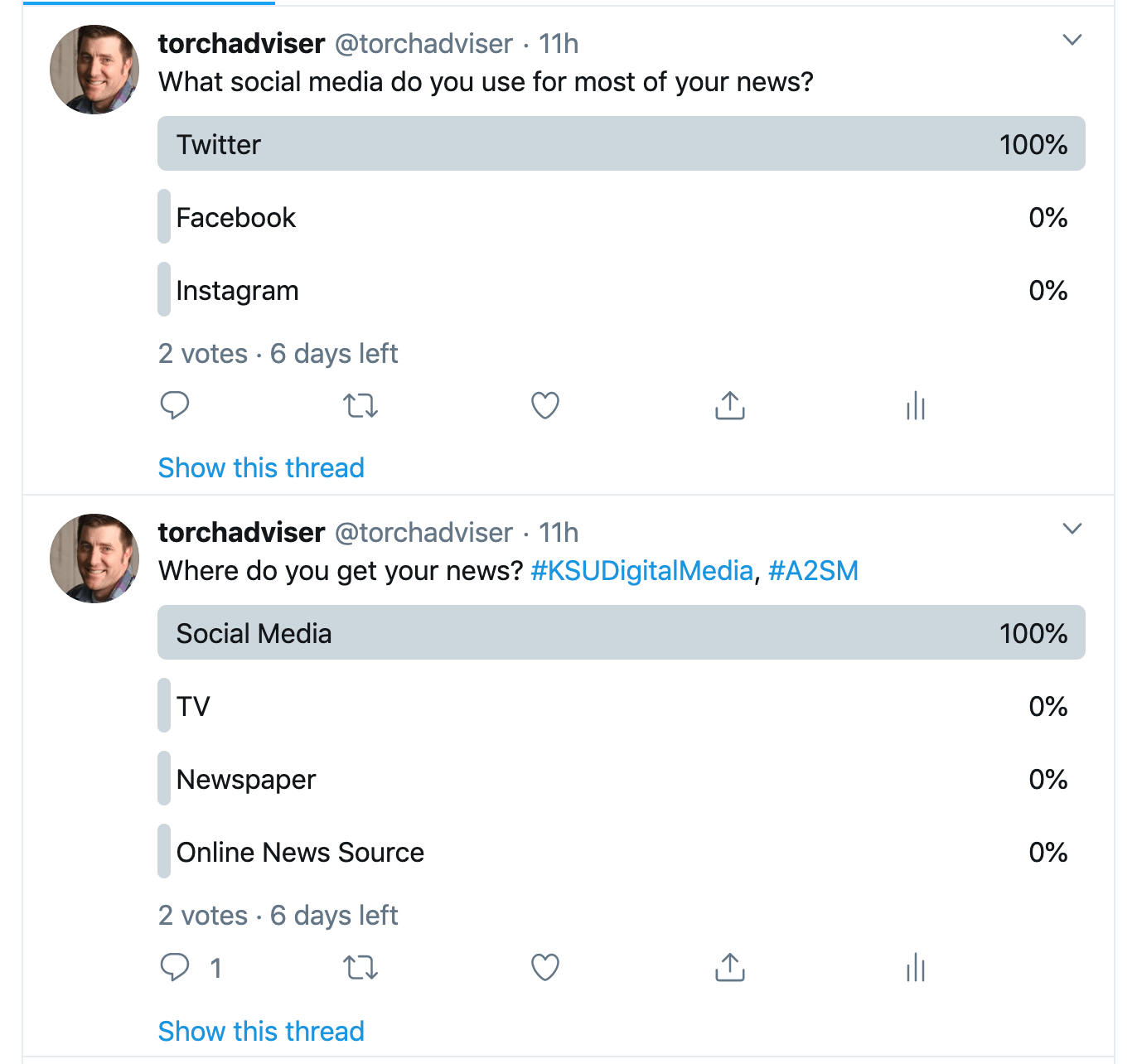
According to my research and interviews this week society already gets a large percentage of their news online. Perhaps my parents still watch the nightly news, but working-age individuals and younger are not watching the news on their television set. My interviewees ranged from 16 to 50 years old and we focused on where they get their news and how often they go looking for news.  The information they gave was not surprising to me, but as a fan of news it scared me that young adults are not consuming enough news. Perhaps a bigger concern was the fact they are reading news that is being filtered to them and they do not know who is filtering it.

The 16-year-olds I interviewed are consuming all their news online. They are not visiting local news sites; they are reading only the information they find on social media. They are constantly reading, browsing or responding to others on social media, but they are less inclined to stop and read an article than adults. Talking with my first student convinced me to do a little further investigation about where students find news. According to my classes they are not using news apps or even frequenting news websites. They are solely living on news they find on social media and following the link where it takes them, if they click the link at all.

The adults interviewed consume news a little differently, but not nearly as frequently. Wait–let me rephrase that; they scroll less, but follow through and read more. It turns out real life gets in the way of constantly scrolling. Adults save their scrolling for before work over a cup of coffee, during lunch or on a break, but once they are off work scrolling happens more frequently. In fact, it often turns into a rabbit hole and adults get lost reading or watching news. Two of the adults interviewed did use news apps. Apple News was used by one of the male teachers. It also happens to be my app of choice. I imagine having a couple of subscriptions on Apple News would be great, but for now I will stick with my free version. 

One of the most concerning issues behind people finding their news on social media is someone owns those companies and has some amount of control over what you see. An article found online at Forbes raises the concern over who is controlling what we see. As educated news readers we need to know where ou\r news is coming from and who is dictating what we read.

News consumption today has changed greatly since the day of staying up late at Grandma’s house. We have gone from it being a family gathering to an isolating event on our phone. That is perhaps one of the greatest problems I see with social media being the driving force behind news. It detaches us from those around us and encourages us to spend more time on our devices. Not only is the news drawing us into our devices it is also curating the information for us without our knowledge.

A blessing or a curse? 

Social media helps us find the news, but at what cost?

When I was a kid we always waited up to watch the news at Grandma’s house. It wasn’t the news that was important to us, but the fact that we got to stay up late as kids. Staying up until 10:30 was a big deal. The news is what kept my grandma and parents awake. It was their opportunity to see what was going on in their town, county, nation and the world.

Twenty years ago it was not hard to find the news. You picked up a paper or watched it on the T.V. Today it is even easier. You may not know where you are going to find your news on a daily basis, but you will have no problem finding it. In today’s world people want their news minutes after it happens, if not while it is happening. News is constantly happening and people want instant access to it. People are not sitting around waiting for the 10 o’clock news anymore. Instead, they are constantly scrolling and looking for minute-by-minute updates. As journalists we have to get them to stop scrolling.

According to my research and interviews this week society already gets a large percentage of their news online. Perhaps my parents still watch the nightly news, but working-age individuals and younger are not watching the news on their television set. My interviewees ranged from 16 to 50 years old and we focused on where they get their news and how often they go looking for news.  The information they gave was not surprising to me, but as a fan of news it scared me that young adults are not consuming enough news. Perhaps a bigger concern was the fact they are reading news that is being filtered to them and they do not know who is filtering it.

The 16-year-olds I interviewed are consuming all their news online. They are not visiting local news sites; they are reading only the information they find on social media. They are constantly reading, browsing or responding to others on social media, but they are less inclined to stop and read an article than adults. Talking with my first student convinced me to do a little further investigation about where students find news. According to my classes they are not using news apps or even frequenting news websites. They are solely living on news they find on social media and following the link where it takes them, if they click the link at all.

The adults interviewed consume news a little differently, but not nearly as frequently. Wait–let me rephrase that; they scroll less, but follow through and read more. It turns out real life gets in the way of constantly scrolling. Adults save their scrolling for before work over a cup of coffee, during lunch or on a break, but once they are off work scrolling happens more frequently. In fact, it often turns into a rabbit hole and adults get lost reading or watching news. Two of the adults interviewed did use news apps. Apple News was used by one of the male teachers. It also happens to be my app of choice. I imagine having a couple of subscriptions on Apple News would be great, but for now I will stick with my free version. 

One of the most concerning issues behind people finding their news on social media is someone owns those companies and has some amount of control over what you see. An article found online at Forbes raises the concern over who is controlling what we see. As educated news readers we need to know where ou\r news is coming from and who is dictating what we read.

News consumption today has changed greatly since the day of staying up late at Grandma’s house. We have gone from it being a family gathering to an isolating event on our phone. That is perhaps one of the greatest problems I see with social media being the driving force behind news. It detaches us from those around us and encourages us to spend more time on our devices. Not only is the news drawing us into our devices it is also curating the information for us without our knowledge.

This week has taught me that we have to be more creative to get news in front of today’s youth. We cannot just wait around for the nightly news, but we have to create articles and content that can be viewed quickly. Media today needs to grab the consumers’ attention and get to the point before they swipe up. The younger audience does not have a set aside time each day to view media.  They are doing it constantly, always clicking, scrolling and swiping. It is creating an easy way to get media in front of people, but making it harder to get them to engage in it for any period of time. The students in my classes do not consume news on a daily basis. They scroll past it, read the headlines, but they do not click.

Week 1, Lesson Plan

Summary: Today’s world is driven by smart phones and their users are always attached to them. In order to get our content to them we need to create content that can be consumed in short spans of time and located through our social media. That is where MoJo comes in.  Mobile first journalism is the wave of the future and easy for us as a high school news organization to create. Throughout this lesson you will learn the basics and put them to the test when you create your own piece of news on your phone or ipad. The entire piece must  be created, edited and uploaded using nothing but your phone or ipad.

47 Minute Class Period

Learning Outcomes:

  • Students will learn the basics of MoJo and create a piece for our social media or website.
  • Students will understand the basics of producing a piece of media using only their phones.
  • Students will create, edit and post a piece of media using only their mobile devices.
  • Students will understand the power of social media and how it helps us to reach our audience.

Introduction:

Brainstorming Session:

  • What can we cover like this today?
    • Sports
    • Concerts
    • Students
    • Test
    • Homework
    • You name it we can do it

If there is time in class watch one of the examples and discuss it with the class. If not assign them as homework.

Examples: These examples are a little more complex than we will be creating our first time, but this is where we want to be soon. 

https://twitter.com/fenwickmedia This is a twitter feed of another school that is doing a great job with this type of media.

https://www.youtube.com/channel/UCJYHfSOoCqXzSkKvCtqFEBg

Homework: Create a 60 second mobile story. Use the list of ideas from the brainstorm session and find something you want to report on. It could be anything from a game recap, an interview after a test, rehearsal recap, that is up to you.

You will be graded on the following elements:

  • Lede / Intro __ / 5
  • Interview __/ 5
  • Time 50 seconds or more __ / 5
  • At least one Graphic added or music added  __ / 5
  • Posted on Social Media after approved by editor __ / 5

___ / 25

Essay #1, Why MoJo

Mobile journalism is the answer to our problems at Kennedy High School. It will allow us to produce content no matter where we are or what we have with us.

Mobile journalism seems like the wave of the future. It is obvious that cell phones are now capable of production quality videos and audio. My media class has been working on implementing our phones  into our website, but we have been falling short. With the sources from this week’s assignment I am encouraged to make another run at it. 

One of the best sources this week was an article about an Irish broadcast company using mobile journalism to create content for social media. It had two examples that showed the quality that can be achieved using I phones, tripods and attachable mics. All of the equipment they used is easily obtainable and within most high school budgets. The media they are creating allows them to get tv style content out to people who only consume news on social media.

The Mobile Journalism Manual introduces some great points that make using cell phones even more attractive to a high school newsroom. Just by using cell phones, it already makes sense to high school advisers, but adding in the fact that cell phones actually put kids at ease, well, that is like having your cake and eating it, too. According to the manual cell phones are discreet.  That is an understatement in a high school where they are accepted and a part of the culture. If not the culture. No one is going to question a cell phone getting stuck in their face, but students always shy away from the cameras. So that makes cell phones accessible, affordable, discreet and comfortable for the interviewee.  

One of the problems I am working to overcome with cell phones is the fact that journalism students seem to hold a grudge against them. Journalism students always want the best new camera, with the wireless mic, windscreen and the ability to shoot in 4k. I admit it might be my fault.  I love shiny new toys. After the readings this week I need to walk this back and find a way to get my students excited about creating great content. If they can do that it does not matter how they make it. What matters is that we can afford to make it and put the tools into their hands. 

As this class progresses I am looking forward to figuring out how to encourage my students to create more mobile journalism. There are so many quick things we can be doing at our games, assemblies, concerts and other events.  Our parents love videos and photos of their students, and we need to utilize that to get them to our site and consuming our media.

The BBC posted an article that does a good job of showing off the discreteness of using a cell phone. It takes us through one reporter’s journey using his cell phone to film riots in 2011. If cell phones can be used to film something as fast paced as riots, that means they can handle the world we live in every day. 

Using cell phones to create media is something that is attainable for all high school journalism programs. It allows us as advisers to concentrate on teaching on tools we already have in the classroom. That means less fundraising and more creating.

Design a site like this with WordPress.com
Get started